
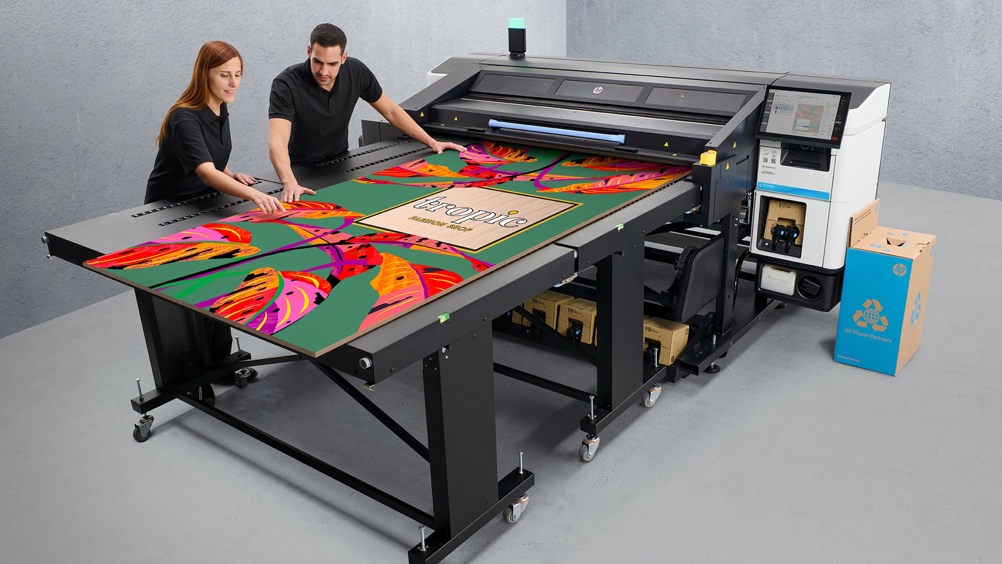
What if your next print project wasn’t on paper, vinyl or banner material — but on wood?
Wood printing is opening new possibilities for print businesses, signmakers, interior designers, retailers and creative professionals looking to offer customers something more distinctive.
By combining the natural texture and character of wood with digital printing, businesses can create everything from branded signage and retail displays to feature walls, décor and personalised artwork.
With modern printing technology designed to handle rigid substrates, printing directly onto wood can be more than another production capability — it can become a new commercial opportunity.
Why print on wood?
One of the biggest advantages of wood printing is that the material itself becomes part of the finished design.
Rather than covering the substrate with another material, direct-to-wood printing allows the grain, colour and texture of the wood to contribute to the visual effect. Depending on the design, the result can range from subtle and natural to bold and highly graphic.
Potential applications include:
- Custom wooden signage
- Retail and point-of-sale displays
- Interior wall décor
- Hospitality and restaurant décor
- Branded panels and displays
- Furniture and decorative elements
- Artwork and personalised products
For print providers, this means more than adding another substrate to the production floor. It creates another way to differentiate the products you sell.
Wood Printing: What do you need to consider?
Wood isn’t a completely uniform printing surface. Different species, colours, finishes, textures and levels of porosity can all affect the result.
Substrate preparation is therefore important. Depending on the type of wood and the application, the surface may need to be cleaned, prepared or primed before printing.
The colour of the substrate also matters. Printing directly onto natural or darker wood can change how colours appear. White ink can provide a foundation that helps colours stand out, while also creating opportunities to incorporate white into the design itself.
The HP Latex R530 documentation identifies raw, primed and painted wood, as well as MDF and MDO, among supported rigid substrates and provides guidance around appropriate substrate presets and preparation.
The key is matching the wood, preparation process, ink technology and printer settings to the intended application.
HandTop UV Flatbed Printers: Built for Wood Printing
For businesses focused on direct-to-substrate printing, HandTop UV flatbed printers offer a practical way to bring wood printing into the production workflow.
Midcomp’s HandTop range is designed for rigid-media applications, including wood, and incorporates features such as Ricoh Gen6 printheads, high-resolution output and options for white ink and varnish, depending on the model.
This combination gives print providers greater creative flexibility.
White ink can help produce stronger colours on darker or naturally coloured wood, while varnish can introduce different visual finishes and highlight selected elements of a design.
For applications such as wooden signage, décor, retail displays and branded panels, the printer becomes more than a piece of production equipment. It becomes a tool for creating finished, differentiated products.
HP Latex R530: One Hybrid Printer, More Possibilities
The HP Latex R530 takes a different approach, combining rigid and flexible printing capabilities in one hybrid platform.
Wood is among the rigid substrates the R530 can handle, alongside other materials used for signage, décor and display applications. It can also work with flexible media, allowing businesses to move between different types of print production.
That versatility matters.
Consider a retailer launching a new store concept. The project could require a printed wooden feature panel, rigid signage, wall graphics and flexible banners. A hybrid printing solution can help a print provider address multiple parts of that project rather than treating each application as a completely separate production requirement.
The R530 also features HP Latex White Ink and HP Pixel Control, giving users additional tools for producing vibrant graphics and white elements across supported media.
The Commercial Opportunity Behind Wood Printing
The most interesting part of wood printing isn’t the technology itself.
It’s what the technology allows you to sell
A restaurant could use custom-printed wooden panels to strengthen its brand identity. A retailer could create distinctive point-of-sale displays. An interior designer could turn a printed wood panel into a feature installation. A sign maker could offer customers a more distinctive alternative to conventional signage.
For example, imagine a boutique retailer that wants a branded display that feels premium and natural. Instead of printing a graphic and mounting it onto a conventional board, a print provider could produce the design directly onto wood, allowing the grain and texture to become part of the finished display.
That difference can help turn a standard print job into a more specialised product.
For print businesses, this creates opportunities to compete on creativity, application and value, rather than simply on the cost of producing a conventional sign or graphic.
From Substrate to Selling Point
Digital printing continues to expand beyond traditional media, and wood is a good example of where this evolution can lead.
Its natural character provides the foundation. Digital printing adds the ability to customise it with colour, imagery, branding and design.
Whether you’re looking at the direct-to-rigid capabilities of a HandTop UV flatbed printer or the rigid-and-flexible versatility of the HP Latex R530, printing on wood can give your business another way to create distinctive applications and explore new revenue opportunities.
The question isn’t simply “Can you print on wood?”
It’s “What could you sell if you could?”
Ready to explore the possibilities? Discover Midcomp’s digital printing solutions and find the right technology for your next wood printing, signage, décor or rigid-media application.