
Choosing a flatbed plotter is about more than finding a machine with the biggest cutting area or the fastest specifications.
The right digital cutting machine should fit the way your business works. The materials you process, the applications you produce, your production volumes, the level of automation you need and the software you use should all play a role in the decision.
For sign makers, digital printers, packaging companies and display manufacturers, a flatbed plotter can transform the finishing process by bringing precision cutting, creasing, routing and other applications into a digital workflow.
But with different machines, configurations and capabilities available, how do you know which flatbed plotter is right for you?
What Is a Flatbed Plotter?
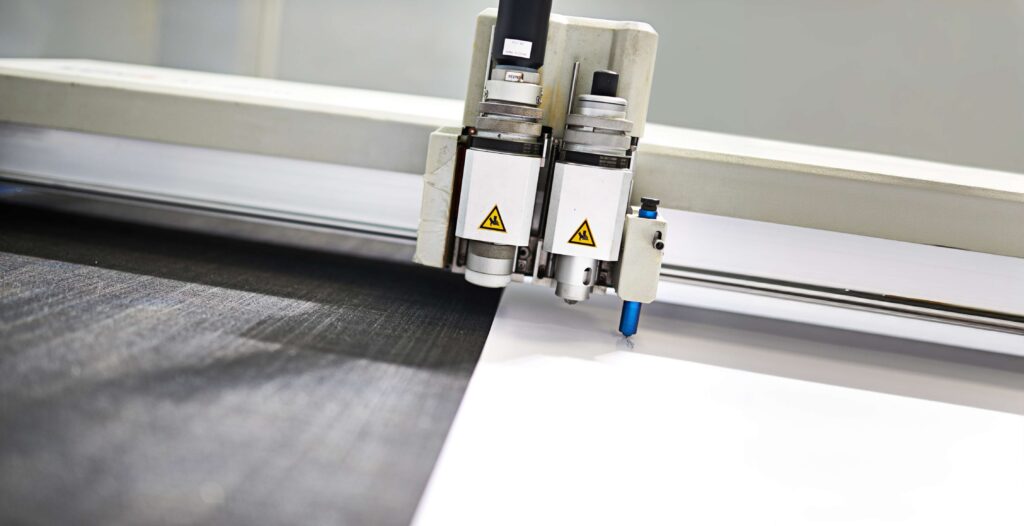
A flatbed plotter, also known as a digital flatbed cutter, uses a cutting head that moves across material positioned on a flat working table.
Unlike traditional die-cutting, digital cutting does not require a dedicated physical die for every shape. This makes the technology particularly useful for short runs, prototypes, customised products and jobs where designs change frequently.
Depending on the machine and tool configuration, flatbed cutters can process a wide range of substrates used in signage, graphics, packaging and other industries.
Zünd, for example, offers digital cutting systems for applications including signs and graphics, packaging, apparel, composites, leather and technical textiles.
This versatility is one of the main reasons digital cutting has become an important part of modern print-finishing workflows.
Why Invest in a Flatbed Plotter?
Before comparing machines, it is worth considering what you want the cutter to achieve for your business.
- Bring More Production In-House
If you currently outsource cutting, a digital cutting system can give you greater control over the finishing process.
Instead of sending printed boards, sheets or other materials to an external supplier, you can cut and finish suitable jobs in-house.
This can help simplify workflow management and give you more control over turnaround times.
- Produce Prototypes and Short Runs
Digital cutting is particularly useful when every job isn’t the same.
Packaging prototypes, custom displays, one-off signs and short production runs can be produced without creating a traditional cutting die.
This flexibility is especially valuable for businesses handling customised work or frequently changing designs.
- Expand Your Product Offering
A flatbed plotter can allow a print business to move beyond standard printed graphics.
Depending on the machine and tooling, applications can include signage, displays, packaging, labels, decals, foam products and other customised products.
For example, Zünd’s systems cover applications ranging from POS displays and shelving to packaging, foam inserts and rapid prototyping.
The Most Important Factors When Choosing a Flatbed Plotter
There is no single flatbed plotter that is right for every business.
Instead, start with your own production requirements.
- What Materials Will You Cut?
This should be one of the first questions you ask.
Different materials require different cutting technologies and tools.
Depending on the machine and configuration, digital cutters can process materials such as:
- Vinyl and adhesive films
- Paper and cardboard
- Corrugated board
- Foam
- Plastics
- Textiles
- Rubber
- Wood
- Aluminium and composite materials
Zünd’s digital cutting systems, for example, are designed to work across materials including paper, cardboard, corrugated board, twin-wall sheets, wood, vinyl, plastics, rubber, foam, textiles, leather and aluminium.
Think about the materials you cut today but also consider which materials you realistically expect to introduce in the future.
- What Applications Do You Need to Produce?
The material alone doesn’t determine the right machine.
Consider what you want to make.
Are you producing:
- Signage
- Point-of-sale displays
- Retail graphics
- Packaging
- Boxes
- Labels and decals
- Exhibition displays
- Foam products
- Textile graphics
- Custom shapes
- Prototypes?
Your applications will determine which tools and machine capabilities you need.
A cutter configured primarily for vinyl and film applications may have very different requirements from a system designed to process rigid boards, packaging materials or composites.
- Which Cutting Tools Do You Need?
Tooling is one of the most important differences between digital cutting systems.
Depending on the machine, applications can involve cutting, kiss cutting, creasing, V-cutting, routing and other processes.
Zünd’s modular approach allows different tools to be configured according to production requirements, while the D3 system can accommodate multiple tools on each beam and includes automatic tool initialisation.
When comparing machines, don’t simply ask, “How fast does it cut?”
Ask:
“What can it cut, and what can it do to the materials I sell?”
That question will often tell you much more about whether a machine is suitable for your business.
- Choose the Right Cutting Area
Machine size is important—but it shouldn’t necessarily be the first consideration.
The correct cutting area depends on the materials you use, the sheet sizes you regularly process and the maximum print formats coming from your printers.
For example, the Zünd G3 is available in a broad range of configurations, with cutting widths ranging from 1,330mm through to 3,210mm and multiple table lengths.
Before choosing a machine, look at the actual sheet and media sizes moving through your production department.
A larger table isn’t automatically better if you rarely use the additional capacity.
Conversely, choosing a machine that is too small can create unnecessary handling and prevent you from efficiently processing the formats your customers require.
- Consider Your Production Volume
Think about how often the machine will be used.
A business producing occasional prototypes and customised signage may have different requirements from a production environment processing hundreds of jobs.
Consider:
- Average jobs per day
- Typical production volumes
- Number of operators
- Required turnaround times
- Repeatability
- Automation requirements
- Future production growth
For higher-volume environments, automation can become particularly important.
The Zünd D3, for example, uses a dual-beam system designed for large-format production, while its automated tool initialisation helps streamline tool setup.
- Look at Automation and Workflow Integration
A modern digital cutter should not operate in isolation.
Consider how easily it can integrate into your existing production workflow.
This includes your design software, RIP workflow, printers, file formats and production management processes.
Software compatibility is particularly important when you’re producing printed-and-cut graphics.
Look for workflows that can reduce manual setup, improve repeatability and make it easier to move from artwork to finished product.
- Don’t Overlook Material Hold-Down
A cutting table needs to keep the material stable during processing.
Vacuum systems are therefore an important consideration, particularly when working with larger sheets or materials that need consistent hold-down.
The Zünd S3, for example, uses a steplessly adjustable vacuum system across the width of the machine to hold materials securely during cutting.
When comparing machines, consider how the vacuum system works and whether it suits the materials and formats you process.
- Think About Support and After-Sales Service
Buying the machine is only the beginning.
A digital cutter can become an important part of your production workflow, so technical support, training, maintenance and spare parts should be part of the buying decision.
For a production business, the question isn’t simply:
“How much does the machine cost?”
It is also:
“What support will I receive throughout the life of the machine?”
Which Flatbed Cutter Is Right for You?
Midcomp offers digital cutting solutions from leading manufacturers, including Summa, Zünd and JWEI, allowing businesses to consider different approaches to digital finishing.
Summa
Summa’s cutting technology covers a range of professional cutting applications, with systems designed around different production requirements and formats. Its range includes drag, tangential and camera-guided cutting technologies.
Zünd
Zünd offers modular digital cutting systems designed for applications ranging from signs and graphics to packaging, apparel, composites, leather and technical textiles. Its range includes the G3, S3, L3 and D3 systems.
The G3, for example, offers a modular configuration and can process materials up to 110mm thick depending on the configuration.
JWEI
JWEI digital cutters form part of Midcomp’s finishing-equipment portfolio, providing another option for businesses looking to introduce digital cutting into their production workflow.
The important consideration is not simply which brand you choose, but which machine configuration best matches your materials, applications, production volumes and workflow.
Flatbed Plotter Buying Checklist
Before investing, ask yourself:
Materials: What materials do I cut now—and what might I cut in the future?
Applications: What products will the machine produce?
Tools: Which cutting, creasing, routing or finishing tools are required?
Size: What are the largest sheet and print formats I regularly process?
Volume: How many jobs will the machine handle each day?
Automation: How much manual intervention can be reduced?
Software: Will the cutter integrate with my existing workflow?
Support: What training, service and technical support are available?
Growth: Can the machine adapt as my business and applications expand?
Choose for Your Workflow, Not Just the Specification Sheet
A flatbed plotter is a significant investment, so the best starting point isn’t a list of impressive specifications.
Start with your business.
Look at the materials you process, the products your customers request, the production volumes you handle and the applications you want to bring in-house.
Then choose the machine, cutting area, tooling and automation level that support those requirements.
With the right digital cutting solution, a flatbed plotter can become much more than a finishing machine. It can help you prototype faster, reduce outsourcing, produce customised work and expand the range of products you can offer.
Looking for the right flatbed plotter solution for your business? Explore the digital cutting equipment available from Midcomp and speak to our team about your application and production requirements.